

Product

One HPC portal for every workload on your cluster

Batch jobs, MPI across servers, GUI apps on a personal desktop and web apps like Jupyter, from the web portal, the hpcxs CLI on a laptop, the in-cluster xsrun command or the REST API.

New to these words? HPC in plain words

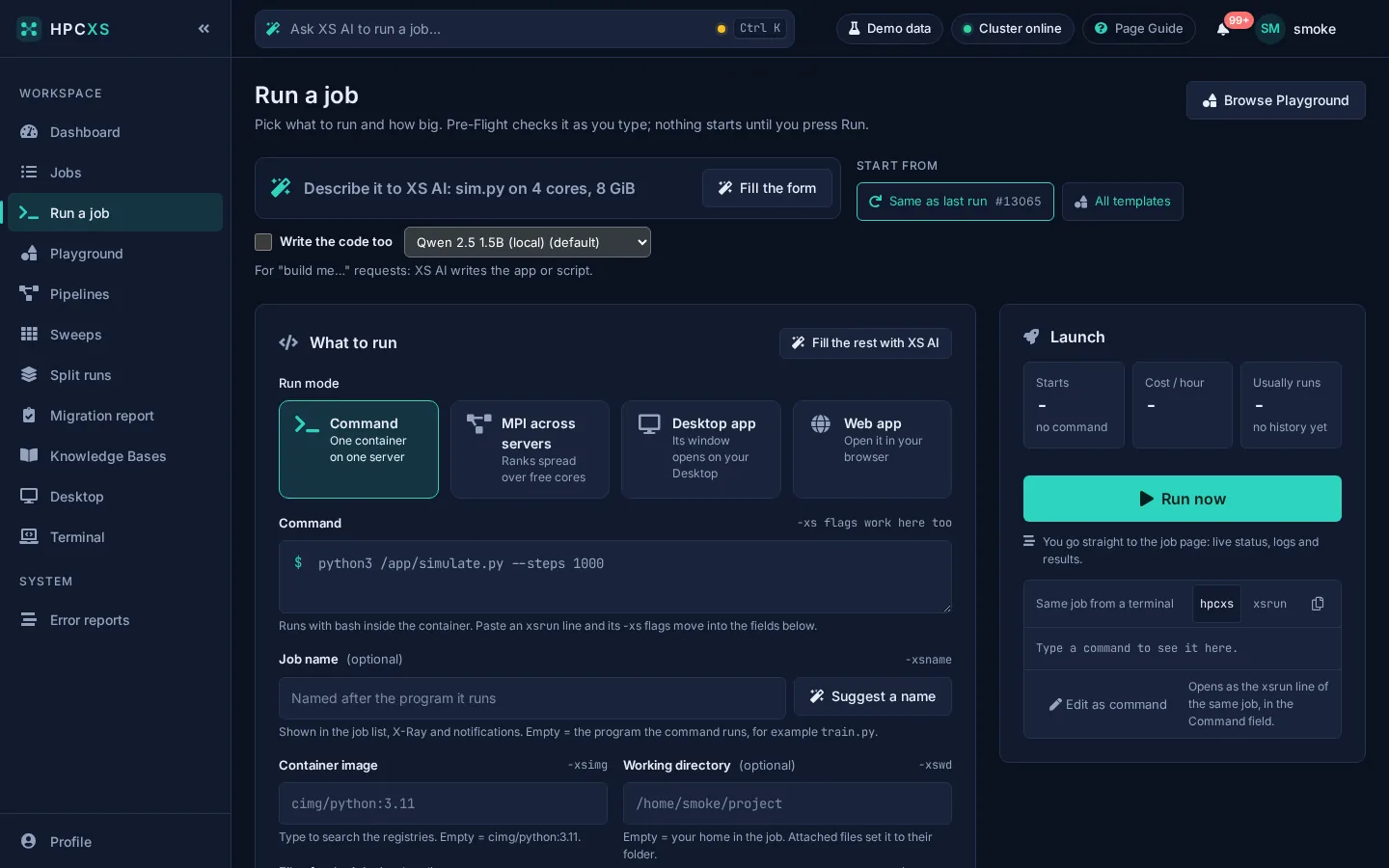
The Run a job page: XS AI box, run modes Command, MPI across servers, Desktop app and Web app, and a Launch panel with start time and cost

Remote desktop

A Linux workstation per user, in the browser

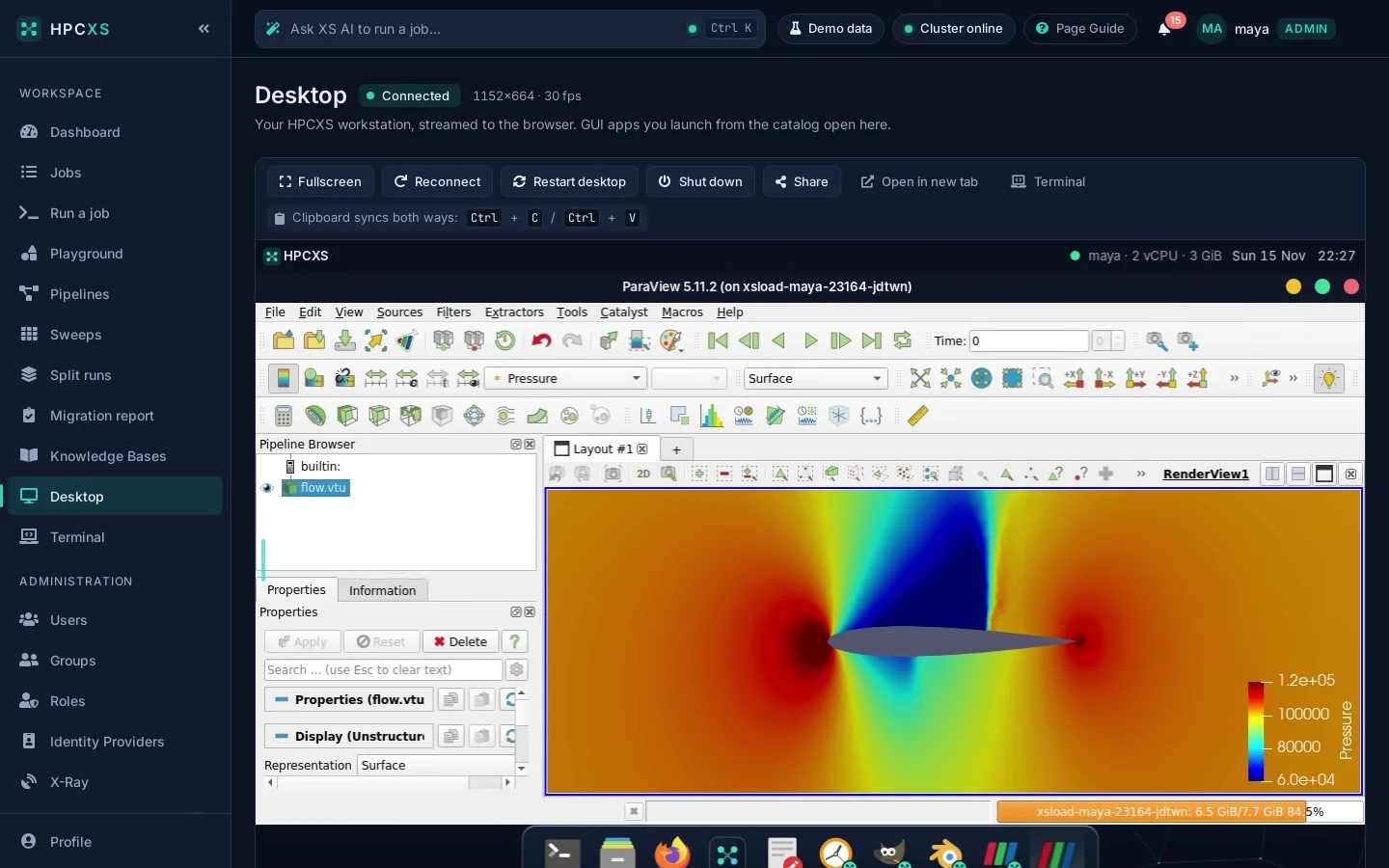
Each user gets a personal desktop on the cluster, streamed to the browser over WebRTC (WebSocket fallback). GUI programs started as jobs open their windows on it. It installs as an app on Windows, Mac, Linux, iPhone and iPad.

  • About 30 fps at 1080p and about half a core per desktop for typical use (desktop sizing)
  • View-only share links; admin support access is confirmed, time-limited and audited
  • Idle desktops are paused to give the cores back
ParaView window on the HPCXS desktop in a browser tab, with a notification that the job's window is open

XS AI

Prompt-to-Job

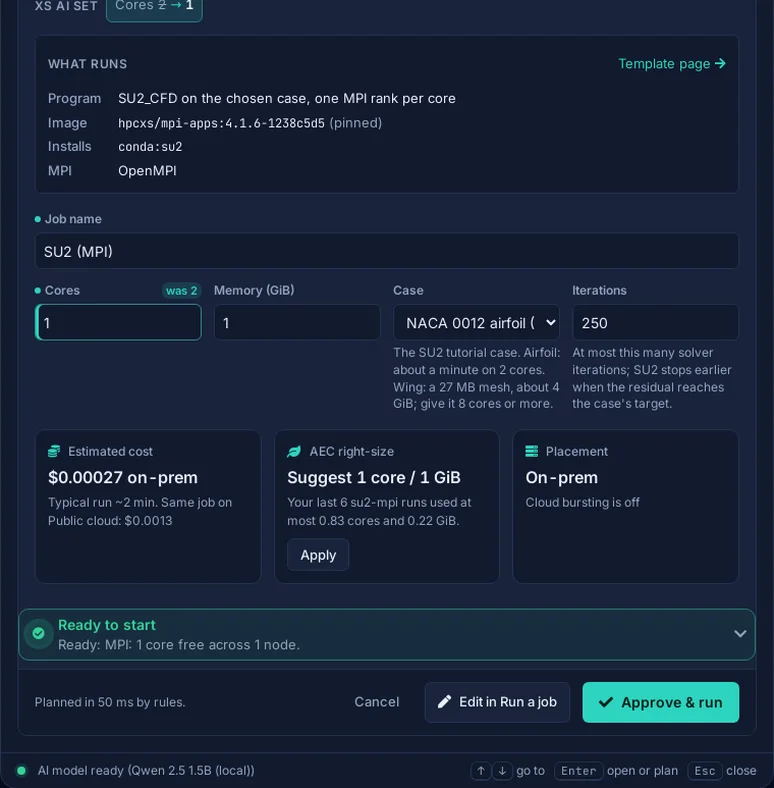
Type what you want in plain English; Hebrew works for template prompts too. XS AI shows its steps as they happen, matches a template or writes a command, and fills an editable plan. Pre-Flight checks cores, quota, image and storage before anything starts.

XS AI can also write small apps and scripts ("build me a dashboard of these results"), answer questions from the product docs, and search your past runs ("which run reached the best accuracy?").

XS AI plan card with editable fields, estimated cost on-prem and on a public cloud, and placement

Auto-Fix

Failed jobs explain themselves

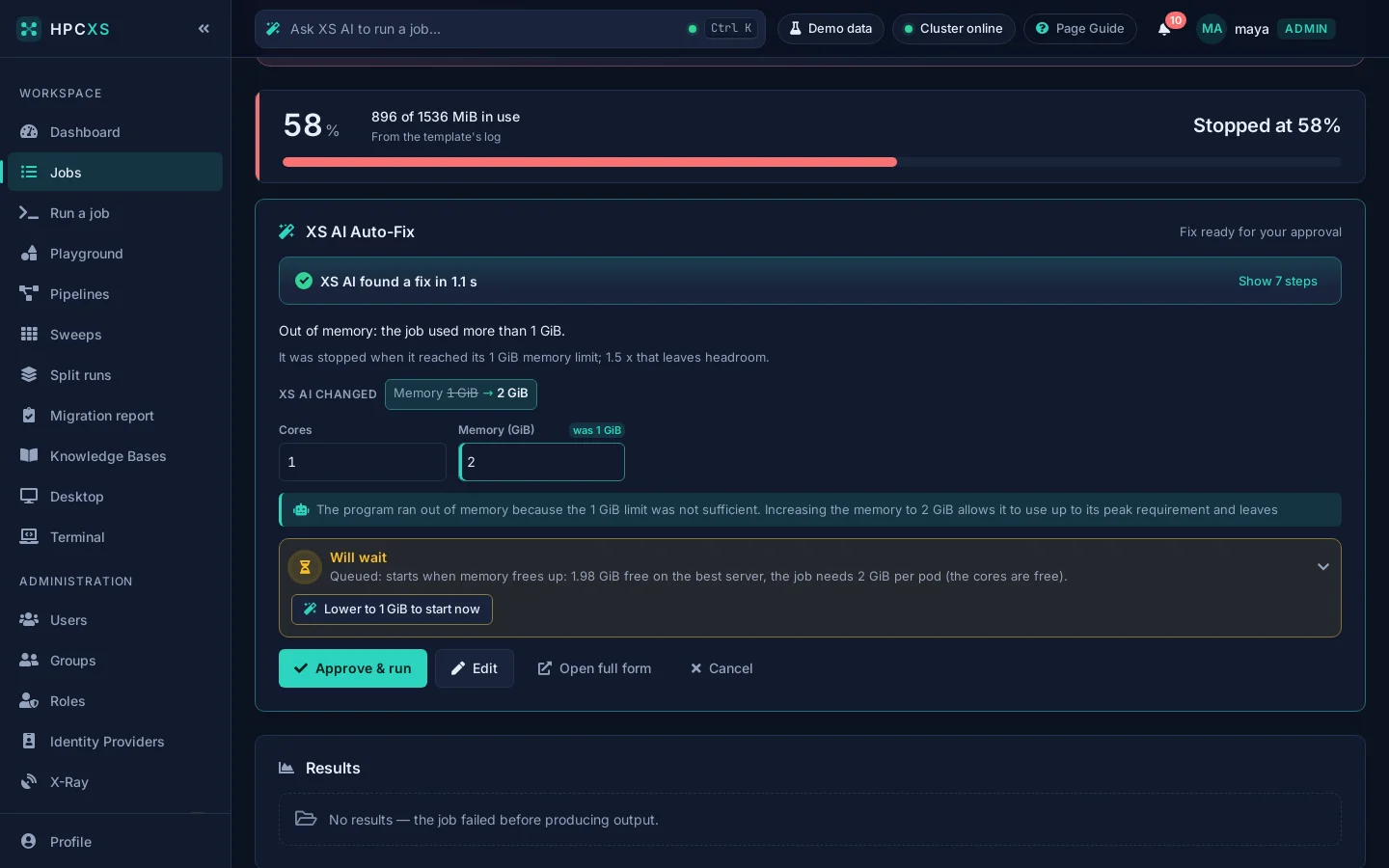
When a job fails, XS AI reads the log, says why in plain words and proposes the fix: more memory, fewer cores, a missing Python package. The change is highlighted, you can edit it, and nothing runs until Approve & run. The same buttons appear in the failure email, Slack or Teams message.

XS AI Auto-Fix card: out of memory at 1 GiB, memory raised to 2 GiB, Approve & run button (demo data)

MPI and X-Ray

MPI across servers without hostfiles

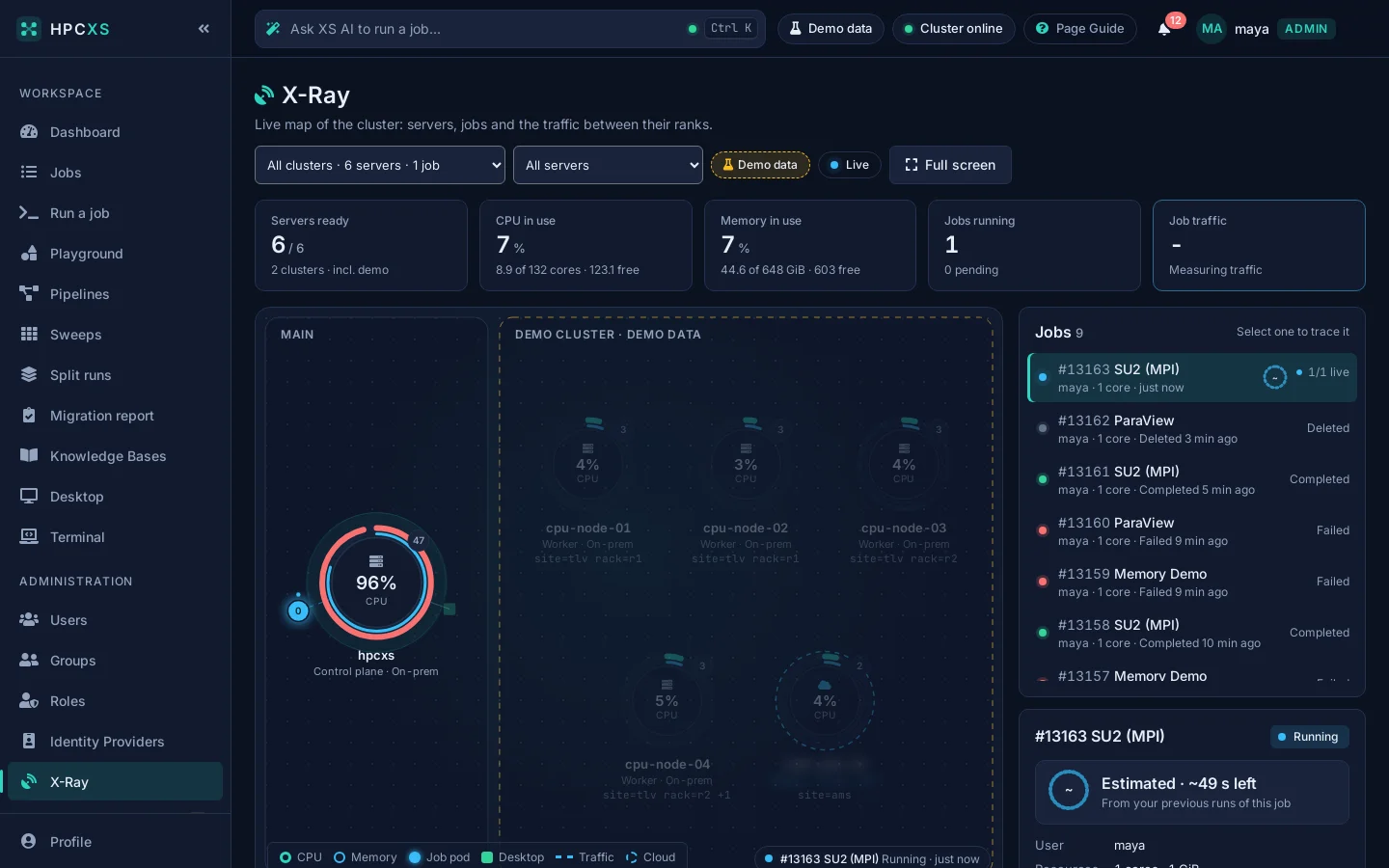
Ask for a number of cores. HPCXS fills the best servers first, starts one pod per server, connects them over SSH inside the job and calls mpirun (OpenMPI, MPICH or your own). If the cores are busy the job waits in a real queue with its position and an estimated start.

  • RDMA / InfiniBand servers detected and used with -xsrdma
  • Checkpoint, move a running job to another cluster, resume
  • Parameter sweeps, pipelines and split runs with live progress
X-Ray live map of servers and an MPI job's ranks (demo data)

Playground templates

Ready-made templates for real work

The Playground is a gallery of ready-to-run templates. Pick one, set a few fields (cores, servers, inputs), and Pre-Flight checks it before it starts. The log, results, charts and files come back on the job page. Start a template from the web portal, from XS AI in plain English or Hebrew, or with xsrun in the terminal.

Admins add their own templates, users save any good run as a template and share it with their team, and users publish their own apps to the catalog for admin approval.

CFD

SU2 and OpenFOAM solve airflow and fluid flow as MPI jobs across servers. Ansys Fluent runs in batch with your licensed image and license server.

*Examples:* the NACA 0012 airfoil or the 3D ONERA M6 wing with SU2 on 16 cores; a lid-driven cavity with OpenFOAM at 320 x 320 cells.
Chemistry and materials

GROMACS for molecular dynamics, NWChem for DFT energies of molecules, Quantum ESPRESSO for the electronic structure of materials, each as an MPI job.

*Examples:* a water box at 300 K with GROMACS; benzene with B3LYP and cc-pVTZ in NWChem; an SCF calculation of bulk silicon in Quantum ESPRESSO.

AI and machine learning

PyTorch training with DistributedDataParallel. The loss curve, the model's predictions, metrics and the trained weights come back as results.

*Example:* train an image classifier on 4 parallel workers.

Rendering and visualization

Blender Cycles renders a scene to a PNG, up to Full HD. ParaView opens on your remote desktop, on its own or connected to a parallel ParaView server spread over the cluster.

*Examples:* render a Full HD studio scene; slice and color an OpenFOAM result in ParaView; explore a 33-million-point volume with parallel ParaView.

Math and data

GNU Octave (MATLAB-compatible) as a batch script, a desktop app or a notebook. Jupyter Lab with NumPy, pandas, SciPy and Matplotlib in a browser tab, next to your data.

*Examples:* run a heat-diffusion script and collect its figures; analyze results in a notebook on the cluster.

MPI and parallel

MPI app runs almost any parallel application from Ubuntu, conda-forge or pip packages, with OpenMPI or MPICH. mpi4py for parallel Python, and Monte Carlo pi to watch MPI at work.

*Examples:* the LAMMPS Lennard-Jones benchmark across servers; a prime count split over many cores in Python.

Playground and Benchmarks

Ready-made workloads and honest numbers

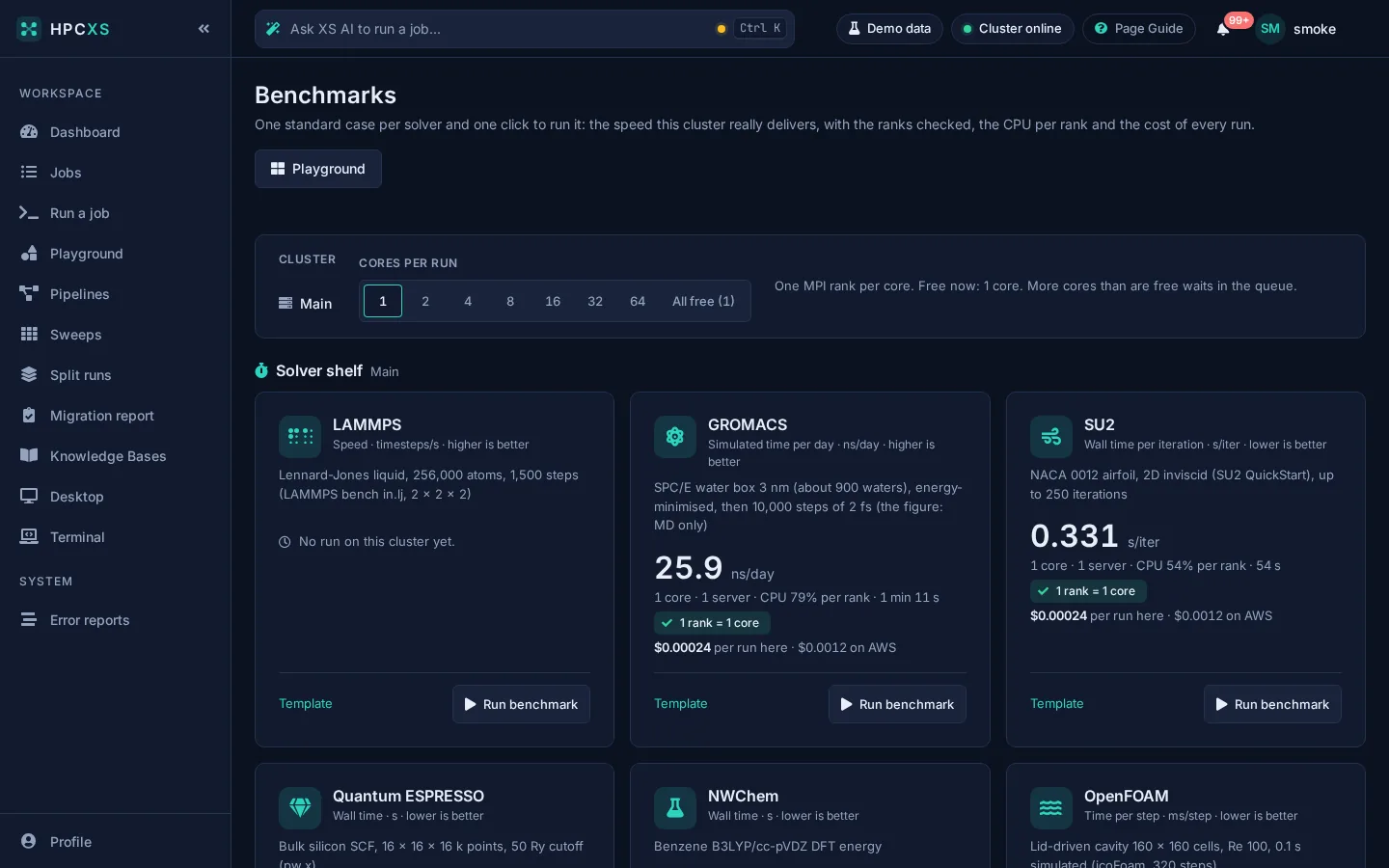
Templates for OpenFOAM, SU2, GROMACS, Quantum ESPRESSO, NWChem, mpi4py, Blender, PyTorch, Jupyter, ParaView and Octave, plus Ansys Fluent with your own image and license. Benchmarks run one standard case per solver and report the speed, the ranks checked against the cores, the CPU per rank and the cost per run.

Benchmarks page with solver cards for LAMMPS, GROMACS and SU2 showing speed, ranks per core and cost per run

Cloud bursting

Hybrid, on your terms

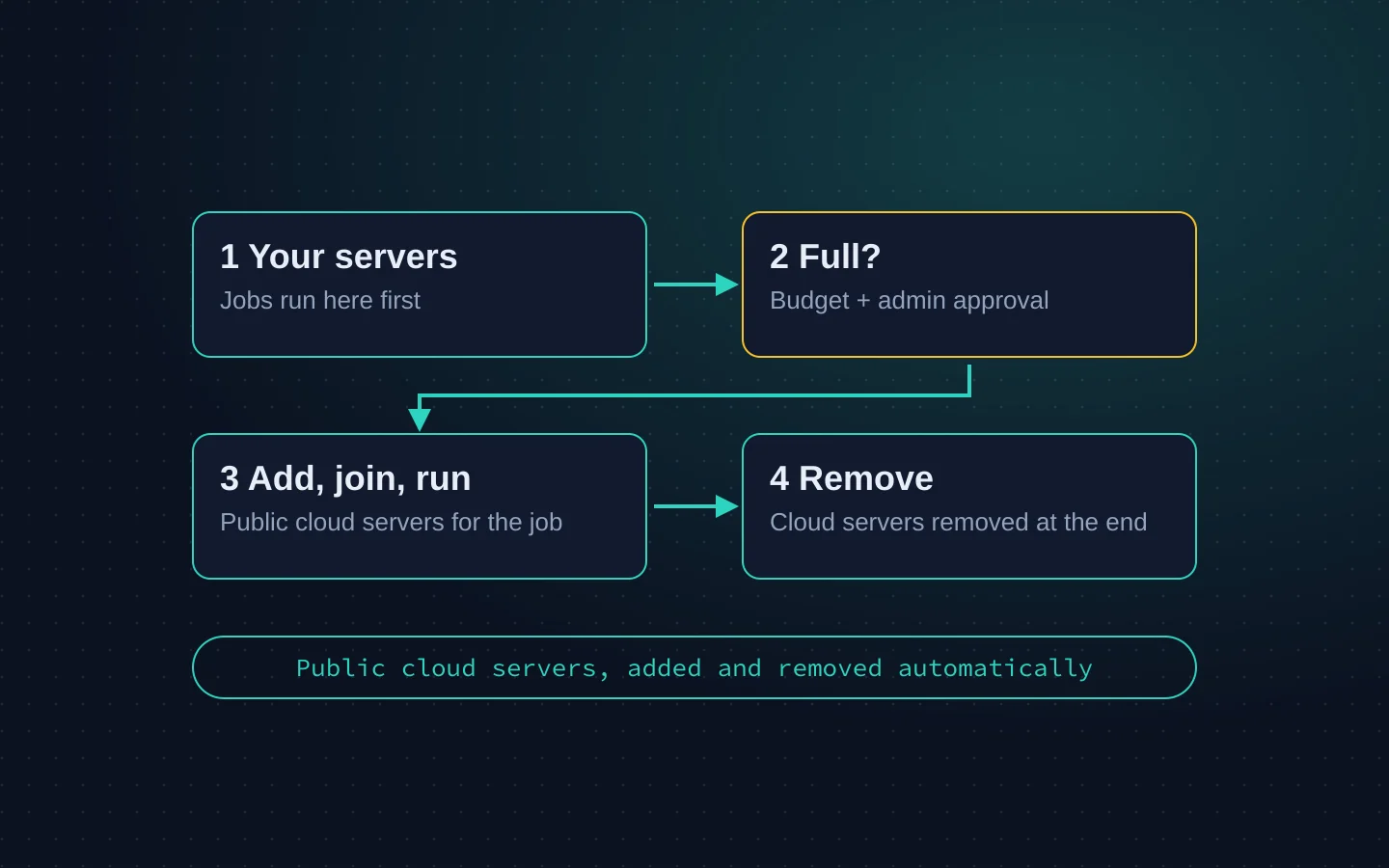
On-prem first. When the cluster is full, HPCXS adds public cloud servers automatically, joins them, runs the job and removes them when it ends. You set the budget, the maximum number of servers and whether every burst needs approval; the cost shows live on the job page.

  • MPI jobs can span several cloud servers
  • Placement policy: on-prem only, hybrid on-prem first, hybrid cloud first, or cloud only
Diagram: jobs run on your servers first; when they are full, HPCXS adds public cloud servers within a budget and with admin approval, runs the job and deletes the servers.

For administrators

Control without tickets

Quotas and projects

CPU, memory, GPUs, jobs, desktop size and home quota per user, group or project, with the source of every value.

Roles and audit

Admin, Operator, Monitor, User and Viewer, plus custom roles. Every sign-in, setting and job change in one audit log with CSV export.

Usage & ROI

Who used what, utilization, and what the same work would have cost on a public cloud, from your own job records.

Efficiency (AEC)

Requested versus really used, an efficiency score, right-size hints in the form and a weekly briefing for the IT manager.

Server care

Drain & Patch maintenance with a live timeline, predictive health checks per server, and high availability with three control-plane servers.

Slurm, PBS, LSF

Existing scripts and commands keep working, with a migration report. A REST API and a CLI for everything else.

HPC in plain words

What these words mean

The terms you meet on this site, for readers who don't run servers for a living.

HPC and clusters

HPC (high-performance computing) means using many servers together as one big computer, for work too big or too slow for a laptop. A cluster is that group of servers: like a kitchen with many cooks instead of one.

HPC portal and HPC as a service

An HPC portal is a website in front of the cluster: people sign in, start jobs and get results without scripts or SSH. HPC as a service means the cluster feels like a cloud service, while it runs on servers you own. That is what HPCXS does. More questions: FAQ.

A job

One task you hand to the cluster: run this simulation, train this model, render these frames. HPCXS finds room for it, runs it and brings back the results, like an order you hand to the kitchen.

CPU and cores

The CPU is a server's processor, and each core is one worker inside it. More cores means more of the work happens at the same time. A job asks for the number of cores it needs.

Memory

Memory (RAM) is the desk a job works on: where it keeps the data it is using right now. A bigger model needs a bigger desk, so a job asks for the memory it needs.

GPU

A processor built to do many small calculations at once, which suits AI training and graphics-heavy work. In HPCXS a job can ask for GPUs on a server that has them, and quotas count them per user and group.

MPI

One job split across many servers that talk to each other while it runs. A wing simulation, for example, is cut into pieces: each server computes its piece and they swap the edges. HPCXS runs MPI jobs across servers today, without hostfiles to write.

Batch, GUI and web app jobs

A batch job runs on its own and you collect the results later. A GUI job opens a program's window for you to work in. A web app job starts a tool you use in a browser tab, such as Jupyter.

Desktop in the browser

Each user gets a full Linux desktop that runs on the cluster and streams into a browser tab. Nothing to install: the heavy work stays on the servers, your laptop only shows the picture.

Cloud bursting

When your own servers are full, HPCXS can rent cloud servers for the waiting jobs and remove them when the jobs end, once IT turns it on. Like calling in extra staff for a busy evening.

Kubernetes

The industry-standard engine for running software on many servers. HPCXS runs on it, so your IT team installs and operates it with tools they already know.

See HPCXS on your own workload

A 30-minute call: we show the product live and look at what you run today. If it fits, we install a pilot on your servers.