From scripts to one form
Before: a simulation needed an expert, a script and a scheduler. With HPCXS: the same run starts from one form, or from one sentence to XS AI.


Accessibility settings
Accessibility statement · Report an accessibility issue
The site works without these settings too. They are saved in this browser only.
HPC-as-a-Service on your own Kubernetes
HPCXS turns the servers you already own into a self-service supercomputer, one click from the browser. Engineers open GUI apps in a browser tab, run MPI across servers, and describe a job in one sentence to XS AI. No VPN client, no SSH keys to teach, no scheduler syntax to learn: sign in and work. You keep the data, the hardware and the control.
The real portal on a simulated cluster: yours for 24 hours, ready in seconds.
HPCXS in plain words
Many organizations own powerful servers, but using them takes experts, scripts and waiting. HPCXS turns those servers into a simple website: people sign in, pick what to run (or just ask XS AI in plain language) and get the results, charts and files back. IT sees who uses what and what it costs, and when the servers are full, HPCXS can borrow cloud servers automatically once IT turns that on.
New to the terms? HPC in plain words
Before: a simulation needed an expert, a script and a scheduler. With HPCXS: the same run starts from one form, or from one sentence to XS AI.
Before: whoever grabs the servers first wins. With HPCXS: quotas per user and group, and a queue that waits for room instead of failing.
Before: nobody knows what a run really cost. With HPCXS: every job page shows its run time and its cost, next to what the same run would cost in a public cloud.
Playground
A gallery of ready-to-run templates: pick one, set a few fields (cores, servers, inputs), Pre-Flight checks it, and the results, charts and files come back on the job page. Start from the web, from XS AI in plain English or Hebrew, or with xsrun. See all templates
SU2, OpenFOAM and Ansys Fluent (your licensed image) as MPI jobs across servers. *Example:* the ONERA M6 wing with SU2 on 16 cores.
GROMACS, NWChem and Quantum ESPRESSO for molecules and materials. *Example:* an SCF calculation of bulk silicon.
PyTorch training with DistributedDataParallel, with loss curves and trained weights as results. *Example:* an image classifier on 4 parallel workers.
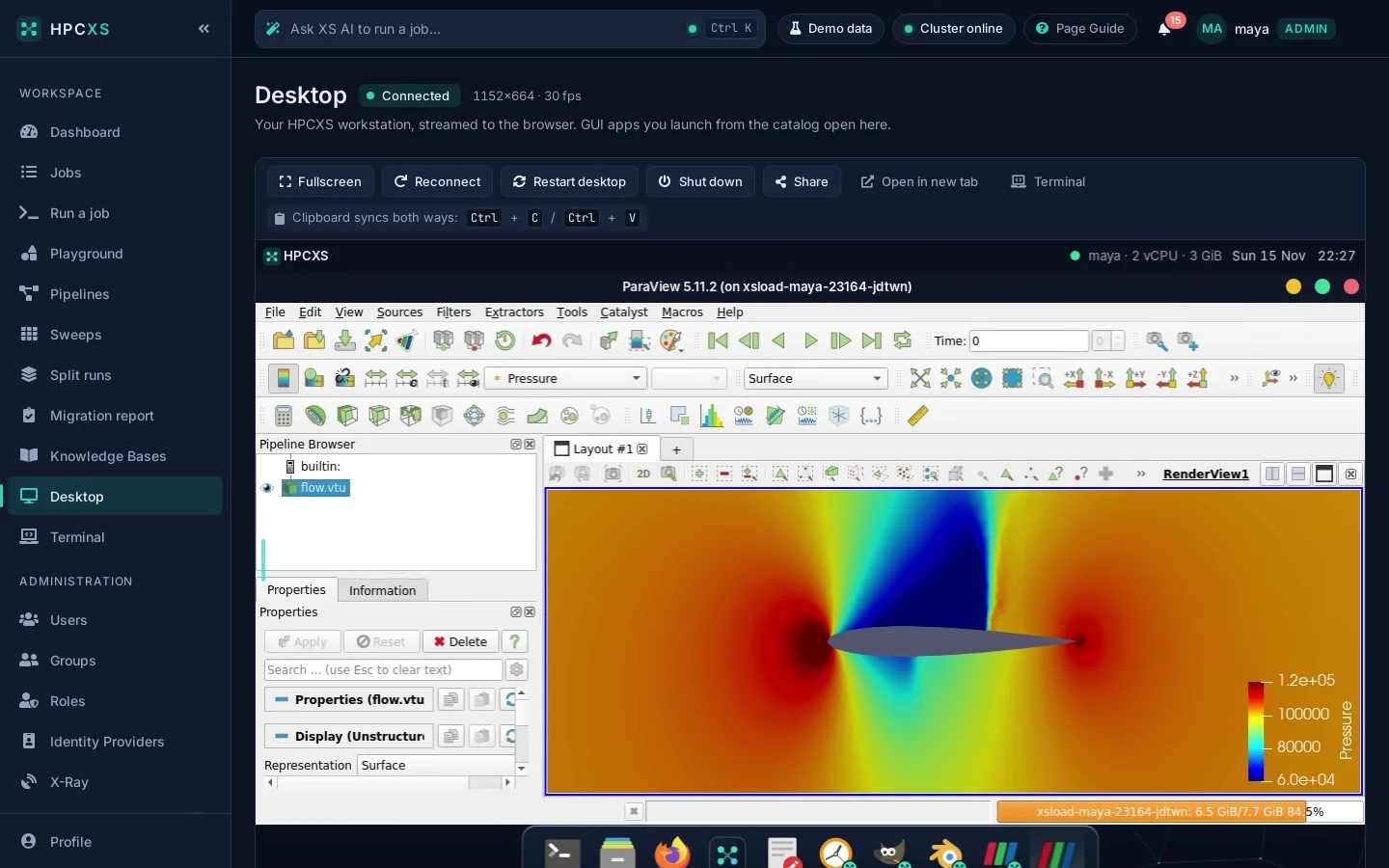
Blender Cycles renders and ParaView on your remote desktop, also as a parallel server. *Example:* a Full HD studio render.
GNU Octave (MATLAB-compatible) and Jupyter Lab in a browser tab, next to your data. *Example:* a heat-diffusion script with its figures.
MPI app for almost any parallel package, mpi4py for parallel Python, and Monte Carlo pi. *Example:* the LAMMPS benchmark across servers.
01 · The breaking point
Legacy scripts, black-box schedulers and scattered servers turn every run into a wait. Fragmentation becomes friction.
Jobs wait in a queue nobody can see into, and engineers wait with them.
One team's servers sit idle while another team runs out, and the cloud is a separate world.
A script per cluster, a workstation per GUI tool, and one expert who knows how it all fits together.
02 · Intelligence at the core
The AEC Engine (AI Efficiency Control) compares what every job and desktop really uses with what it reserved, puts a price on the difference, and sends work to the right resource, on-prem or cloud. One engine. The right resource.
AEC advises a better request and can lower over-sized requests on its own. Users can keep their request with a reason.
Idle desktops are suspended, and idle servers can be put to sleep and woken when work arrives.
AEC decides between on-prem and cloud within the placement policy and budget you set.
03 · Expand the possible
Kubernetes-native. Hybrid by design. When the queue grows, HPCXS can burst to cloud servers by the policy you set, and users submit their jobs exactly as before.
Jobs run first on the servers you already own, with your data and your network.
When on-prem is full, HPCXS adds public cloud servers automatically, runs the job and removes them, with budget caps, approvals and the cost of every burst.
Slurm, PBS and LSF scripts run without changes. A REST API with personal tokens and the xsrun CLI bring HPC into your DevOps tooling, with less reliance on in-house scripts.
Unified control
A number you can take to the CFO: every job shows what the same run would cost on a public cloud, from the built-in cost model, and Usage & ROI adds it up.
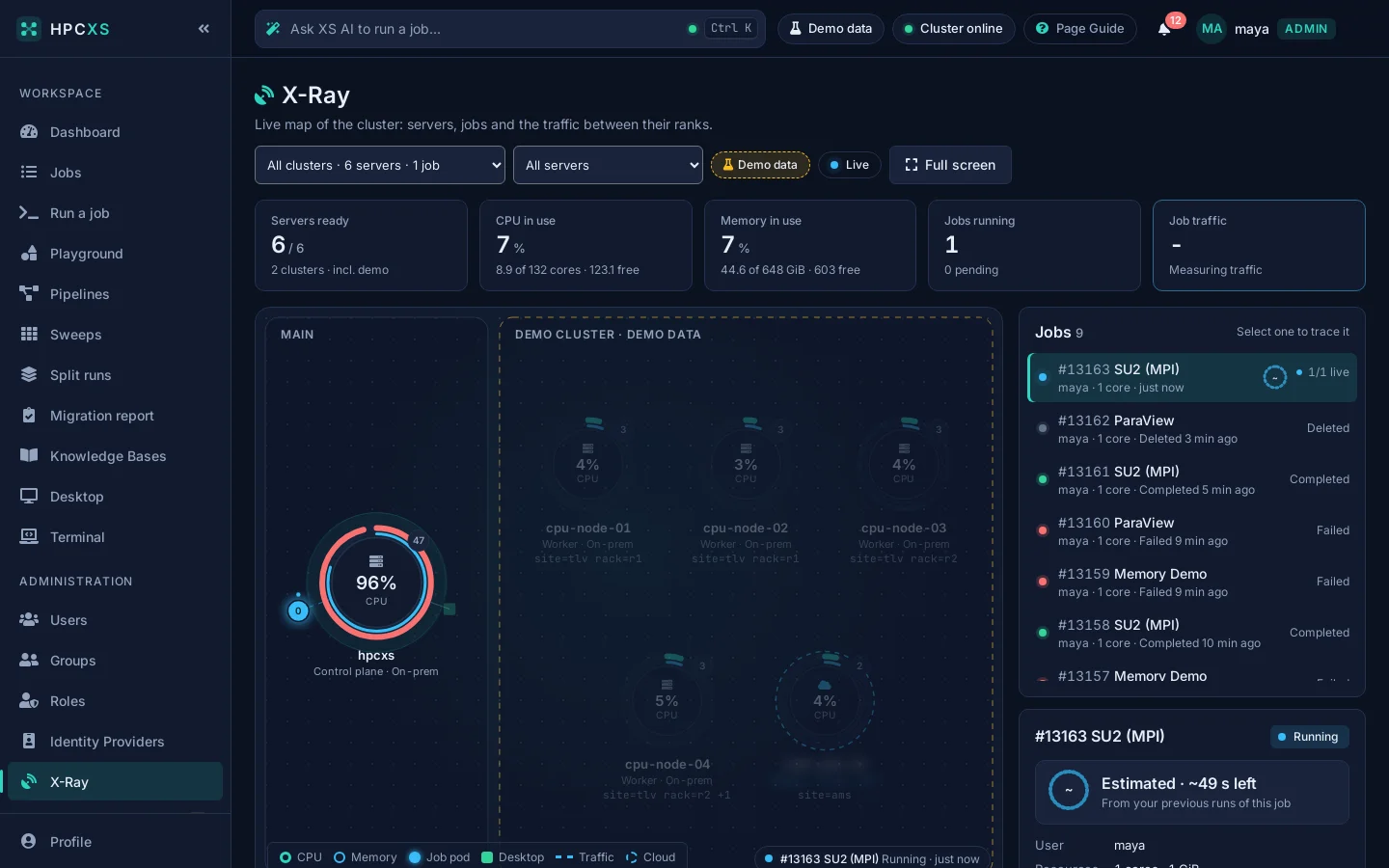
Running jobs and the waiting queue, live. X-Ray shows every job spread across your servers.
Predictive checks on disks, memory, temperatures and network cards. A server at risk is marked so new work avoids it.
See where compute goes by user, group and project, and what it would have cost on a public cloud.
What your users get
Everything below works today on HPCXS. Each card links to the part of the product it comes from.
A personal Linux desktop per user, streamed over WebRTC with a WebSocket fallback. ParaView, Blender and Octave open with one click; files stay in the user's home folder.
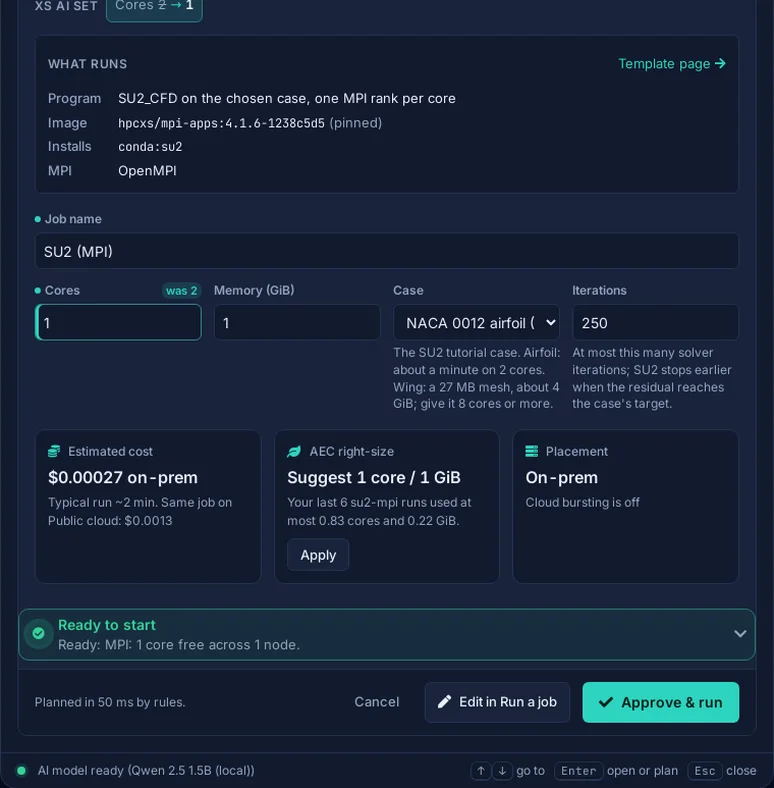
Type render a Blender scene in Full HD. XS AI fills an editable plan with cores, memory, cost and placement. Nothing runs until you press Run.
Pick the number of cores. HPCXS places the ranks, connects the pods and calls mpirun. X-Ray shows the ranks light up and the links pulse with real traffic.
XS AI reads the log, explains the failure in plain words and proposes the fix, for example more memory. You approve, it reruns.
When your servers are full, HPCXS adds public cloud servers automatically, runs the job and removes them, within a budget and with approvals.
Active Directory / LDAP, Microsoft Entra ID, Google, Okta or any OpenID Connect. Roles, quotas per user, group and project, and a central audit log.
XS AI
XS AI is the assistant built into HPCXS. It turns plain English into a job plan you can edit, shows what it will cost here and on a public cloud, and checks that the job fits before it starts.
X-Ray
X-Ray is a live map of the cluster: every server with its CPU and memory rings, the ranks of an MPI job lighting up, and the lines between them pulsing with the real network traffic. Replay a finished job, or put it full screen on the wall.
Up and running
Your servers, your network, your data.
One command, or a web installer, on a Rocky Linux 9 server. About 15 minutes with prebuilt images.
Point HPCXS at Active Directory, Entra ID, Google, Okta or OIDC. A setup wizard walks you through mail, branding and shared folders.
Paste one line on a new server, or add it over SSH from the portal, and pick its role: desktops, jobs or both.
Users sign in with their company account and run. HPCXS places every job and accounts for its use and cost.
Product tour
The real portal at work: XS AI turning a sentence into a job, the Playground, live X-Ray, a GUI app on the desktop, efficiency and cost, and cloud bursting.
The video has no sound; its captions are part of the picture. In order, it shows:
No. HPCXS is self-hosted: the portal, the jobs, the files and the default XS AI model run on your servers. Cloud bursting is off until an admin turns it on, and then only the jobs you allow go out.
Usually not. sbatch, srun, squeue, qsub and bsub with their #SBATCH / #PBS / #BSUB lines run as they are. A migration report shows what runs unchanged and what needs a change.
A first server with 4 vCPU and 8 GB RAM running Rocky Linux 9 (RHEL 9 and AlmaLinux 9 work too), then any number of workers. Sizing guidance for desktops is measured, not guessed.
Yes. HPCXS installs and runs with no internet connection, from one offline bundle that holds the packages, the container images and the XS AI model. Use the web or command-line installer, and add servers to the offline cluster the same way.
We price per server, with a pilot first. See Pricing.
Bring the ambition. Let's unlock the compute. In a 30-minute call we show the product live and look at what you run today. If it fits, we install a pilot on your servers.